Get Marketing Insights First
Subscribe to receive actionable strategies, growth tips, and industry insights delivered straight to your inbox.


Everything you need to build an online store from scratch — store types and payment models, legal and technical requirements, a step-by-step WooCommerce setup, and hard-won tips for managing and marketing your store.
Many business owners want to make their products available for sale online, and with a quick glance at the sales commissions charged by centralized marketplaces such as Amazon, Souq, and others, many of them turn to creating their own independent online store, hoping it will ease costs in the long run.
With this shift, they run into all sorts of trouble understanding how online stores actually work and the details involved — it’s a relatively new field that demands a different kind of technical expertise than running a traditional store. As a company working in this space, we often find ourselves explaining these details and working with business owners to prepare them, in every respect, for selling online.
In this guide we’ll go into all of these details, from the stage of setting your expectations for digital selling and its various types, to the finest technical, legal, and marketing details you’ll need if you intend to build an online store.
An online store is the digital space through which a merchant can display, sell, and market their products on the internet. This isn’t limited to dedicated websites or ones that support on-site payment — it includes every digital space that can be used to sell. For example, using an Instagram account to sell products counts as using an online store.
In short, the online store consists of:
Online stores can be classified in two ways: the first based on the payment method the customer will buy with, and the second based on the type of product stored and how it’s stored and shipped.
These stores enable customers to pay directly with their bank or credit cards within the store interface, and the merchant receives this payment directly in their bank account. Payment gateways process this operation and take a percentage of it.
This type of store usually offers inventory management and payment- and shipment-tracking features from a single, easily accessible interface.
This type includes:
This type of store can support various payment methods not limited to payment gateways — such as bank transfers, contacting the seller directly to pay in cash, or cash on delivery — but it’s distinguished by the ability to pay directly on the page, which sets it apart from stores that don’t support this.
These stores rely on direct payment methods that require the store manager to step in to confirm a payment has arrived, such as manual transfers or cash on delivery. This type of store usually lacks an automated way to track payments and shipments and manage inventory, and it requires extra effort from the store manager for this.
This type includes:
Many digital-store owners use this type of store early on to avoid payment-gateway fees or multi-vendor marketplace fees, but it isn’t a good option for large stores or over the long term. The norm is to use on-site payment for digital stores, and that’s what visitors expect.
These stores require holding an inventory of goods and shipping them to buyers. The most important thing distinguishing them is the constant need to track product inventory and display it to visitors of the sales platform, to avoid them ordering products not available in stock.
This type of store also needs to set the shipping cost for these products in proportion to their size and weight, and display that cost on the front end when products vary widely in weight. Many platforms that support inventory management offer this feature by default.
The most important platforms that offer an easy way to manage inventory:
Such as stores selling digital books, digital courses, software, or games. Compared to stores dedicated to selling traditional products, creating and managing these stores is easier and less costly, since they need no infrastructure for storage or shipping.
Some of these stores require a License Management System, and some store-building platforms provide it by default.
In general, any platform that allows selling physical products can be used to sell digital products without any problems.
Direct shipping, or dropshipping, is a selling method that relies on the product being held in the wholesaler’s warehouses, while the retailer sells the product and passes the shipping information and the item’s original price to the wholesaler, keeping the difference.
This type of store lets sellers get rid of the burden of storing goods and tying up capital in buying them until they’re sold, since the item is purchased directly when the customer orders it.
What matters to dropshipping store owners in their online store is usually the ability to link the inventory file provided by the wholesaler to their site, and this is usually done through an XML file containing product information and available stock quantities.
Many platforms provide this feature by default, such as Shopify, and it can be built into some platforms such as WooCommerce.
One drawback of dropshipping stores is that they give the retailer no control over product quality, which often ends in numerous buyer complaints. Add to that the fierce competition in dropshipping, due to the low barrier to entry and because many of these stores rely on thin profit margins.
When you search online for the difference between e-commerce and traditional stores, you’ll find plenty of myths and misconceptions — largely because most of the people producing this content have no real experience running a store, digital or otherwise. So here’s something genuinely useful for your journey: I’ll walk you through the biggest myths about online stores and the truth behind each one.
Except in the case of selling digital products that require no storage, shipping, or investment of capital in buying goods, the cost of building the online store will be an additional financial burden as a merchant, because it won’t free you from the need to store or ship goods; instead it will add charges for marketing them, receiving payments, and renting the hosting and domain space or the subscription to the service you’ll build your store on.
Whoever says that building an online store is cheaper than opening a traditional one assumes your online store won’t need new staff in areas like development, marketing, and sales separate from the traditional store’s staff, and assumes these costs will be lower than renting premises, paying its bills, and hiring workers there.
You can think of your online store as a new branch for your store — this branch sits in a public square everyone can reach, but creating this branch isn’t free and won’t replace your main branch, from which you ship products and where you store them.
For the extra cost you’ll pay to build your online store, you get added value: your products appear to thousands of people, and their information and details are easily shown to anyone searching for them, at the press of a button from their homes. That’s what encourages them to buy from your store even across long distances.
As we mentioned, e-commerce projects involve a lot of spending. Yes, you can create an online store for free on many platforms and sell simple products on it, but those products and their shipping require capital. For larger projects, the investment needed to enter the e-commerce market can approach what it costs to open a new branch.
This is one of the biggest myths in the field, and it often goes as far as some marketers of digital-commerce courses claiming that e-commerce needs nothing but an internet connection — a completely mistaken notion.
Either you’re well-versed in every field needed for the store to succeed — digital marketing above all — whether that knowledge is enough to work on the store’s success yourself or enough to hire the right person for the role, or you partner with someone who carries that load in building the store, like a capital-holding merchant teaming up with a skilled expert in the field.
But for an online store to succeed like that, without any skill — that’s something unheard of.
Beyond the myths above, online stores genuinely offer merchants and buyers features that make those exaggerations unnecessary — and these features are enough to convince you to open your digital-store branch as soon as possible, if you aren’t already working on it:
Despite their features, online stores still — for now — lack many of the basic elements, which makes them a secondary option for many buyers:
As we mentioned, the journey of building an online store requires many different skills — but they’re not impossible to learn, or at least to grasp in broad strokes. In this guide I’ll try to help you take the steps of creating an online store, starting with the store’s requirements and ending with selling your first product.
In this guide I’ll focus on stores selling physical products stored in dedicated warehouses; by doing so I’ll cover all the details needed to build a dropshipping store or a store for digital products.
Most countries today require a business license to start any operation, whatever its size, and this license is essential when setting up an online store in order to open several accounts you’ll need to run it: it’s required to open a company bank account, then to open an account with the payment gateway that will process payments, and then to open an account with the courier company that will ship products from your warehouse to customers.
The tax number and commercial registration number must also be displayed on the site interface in most countries today, and the official address registered with the state must be provided on the front end.
Even if you intend to sell digital products or dropship, you need to obtain licenses to receive profits and pay taxes on them, and you must verify the type of taxes and the rates you’ll have to pay on profits and income.
These laws and the steps for obtaining licenses vary from country to country, and we aren’t qualified to provide legal advice — but we recommend contacting a financial advisor or a lawyer specialized in this field in the country you live in to confirm the official paperwork required.
You need the bank account to receive the profits coming from the store. Most popular payment gateways allow withdrawing profits to bank accounts exclusively and don’t allow withdrawing them to digital banks or via direct transfers.
The most important specifications you can choose the bank based on:
As for transfer fees, they’re a given: you’ll need to send and receive transfers from the account monthly, and it’s better to reduce these wasted fees as much as possible.
As for managing the account from your phone or computer, that’s essential, because you’ll sometimes need to access the account and confirm that transfers have arrived or gone out — and going to the bank branch yourself would drag out the process.
As for supporting multi-currency accounts, that’s a personal choice. In countries with unstable currencies, storing profits in a foreign currency may be a better option than storing them in the local currency.
In short, a payment gateway is what lets buyers use their credit card or various digital payment methods such as Google Pay and Apple Pay to pay on your store’s checkout page. The payment gateway acts as an intermediary between buyer and seller, securing the buyer’s sensitive card information and ensuring the required amount reaches the seller intact.
If you plan to use a multi-vendor marketplace to set up your digital store — such as Amazon, Noon, or Souq — you won’t need a payment gateway, since these platforms provide built-in gateways ready to use. But if you plan to create an independent store of your own, you’ll need to make sure the gateway you plan to use is compatible with your store software.
Most payment gateways today support the WooCommerce platform and offer excellent integration of their features with the payment system, whether related to refunds, order cancellations, or otherwise.
If you’re looking for the best payment gateway for your case, you should look for payment gateways with the following specifications:
Support payment in the countries you plan to sell in:
For example, you’ll find many payment gateways that support local payment methods such as Mada cards, Vodafone Cash, and others in the Arab region, while foreign gateways support only Mastercard, Visa, Google Pay, and Apple Pay, and not local payment methods.
Support opening an account and withdrawing money in the country you sell from:
For example, you’ll find many payment gateways supported in Saudi Arabia and not in other Arab countries, and if you plan to open an account with one of these gateways, you must hold a business license in Saudi Arabia specifically.
Support use with the platform you want to build the store on:
For example, you’ll find many payment gateways that support WooCommerce and offer no support for other platforms such as Magento and others, so make sure the platform is supported before going through the process of creating an account with the payment gateway.
The team at Musaq provides constantly updated guides on The most important payment gateways that support the Arab region, along with an explanation of how to register with them; you can use them to compare and choose the best among them.
Anyone planning to send physical products to buyers must inevitably deal with a shipping company, and in the case of online stores, this shipping company must support integration with the platform you plan to sell on, and provide a system for tracking parcel status digitally.
The most important things to look for in the shipping companies you’ll work with on your online store:
Otto company provides many options for integrating with shipping companies and with the various e-commerce sales platforms — and it’s the easiest route, in our recent experience, to choosing a courier company and integrating its system with your online store.
After covering these four requirements and conditions, you can start building your online store.
After finishing the preparations and requirements needed before you start building the store, we can now move on to the process of creating the online store itself. To make this easier, we’ll split the topic into three parts: starting with the things you have to pay for, then the installation and integration stage, and finally design and preparing to receive orders.
In this guide we’ll focus on building the store on dedicated hosting, with a dedicated domain, and using WooCommerce software — that’s what we recommend to the company’s clients, and it’s the best platform for independent stores.
If we were to liken the online store to a traditional store, the space you rent to display products corresponds to hosting, and this store’s address on the map corresponds to the domain.
Booking hosting:
What you need to know about hosting is that its specifications affect the following:
There are many types of shared hosting and dedicated servers you can subscribe to, and the type you should choose varies with the store type, the number of products, how often you edit those product details, and your expected sales volume. But for small stores that don’t expect much traffic, shared hosting is enough.
As for stores that expect an increase in traffic and want to invest in premium hosting over the long term, it’s better to use an upgradable VPS, as in Contabo hosting which we recommend all our clients work with, and which we use to host our own projects.
Registering the domain:
As an online-store owner, you won’t need to know much about domain registration. All you need to know is that a domain is registered on an annual subscription, and that the most important feature to look into when registering a domain is a guaranteed price lock.
The best domain registrars currently available Porkbun.com It guarantees you a price lock and full transparency in domain prices.
Some other domain registrars quietly bury, in fine print, terms that raise the subscription price after a year or two — an unnecessary burden over time. On top of that, many registrars drag out routine operations such as DNS changes, which are needed while developing the site, whereas PorkBun completes these operations within minutes.
Technically, to launch a site on dedicated hosting you need a control panel for that hosting, software to manage the store, and additional sub-tools to link this store to the payment gateway, courier company, and others.
Choosing the hosting control panel:
The hosting control panel is the interface that makes it easy for you to manage your site in general, such as creating backups, custom email addresses, and installing the software needed to launch the store.
You can think of the main control panel as the first building foundation the rest of your store depends on.
While booking hosting — whether through Contabo or elsewhere — you’ll be able to choose the control panel you’d like to use. The easiest control panel to use, and the most feature-rich and popular right now, is CPanel, which requires an additional paid subscription on top of the basic hosting subscription.
You can also use the free Webmin panel, as it offers general features sufficient to build the store and can be enhanced using the free Virtualmin as well.
Choosing the software you’ll build the store on:
In this case, we’ll use the open-source (free) WordPress and WooCommerce software to build the store, and the CPanel control panel offers a one-click option to install this software. You can also learn about the installation steps without a control panel from the following guide.
After installing and choosing the platform configuration and adding WooCommerce, you can move on to the integration stage with payment gateways and shipping companies.
In this guide we won’t explain the details related to configuring The WordPress platform and The WooCommerce plugin Both are explained in detail within the official documentation files.
Installing the plugins needed to integrate with payment gateways and shipping companies:
After subscribing to the payment gateway or courier company, you’ll often receive a guide for integrating these platforms with your online store. If you can’t find the guide, you can message the company’s technical support or search using “WooCommerce Integration + platform name.”
For example, when searching for “Aramex WooCommerce Integration,” you’ll find on the first page the plugin you need to install to achieve the integration — free version and another paid, with broader options.
The same goes for the Tabby payment gateway — you’ll find on the first page the needed plugin to integrate it with the store.
The WordPress platform offers an easy way to change the site’s design and page details through a visual editor and an excellent template system. With our clients we use a set of the best plugins in this area, and we recommend using them to build your online stores so they load blazingly fast.
An excellent online-store template for WordPress + WooCommerce:
In all the projects we work on we use Blocksy template – Blocksy for the following reasons:
The template is available in Arabic and fully supports right-to-left languages, and the template’s developers focus on providing ongoing support for it and adding features to it.
The blazing-fast GreenShift page builder:
You need a page builder to design your store’s home page, static pages, and landing pages, and the most important feature to look for in these tools is speed — which is provided by The GreenShift tool better than any other tool currently available, and it’s available in a free version sufficient for simple use and a paid version offering a huge set of elements.
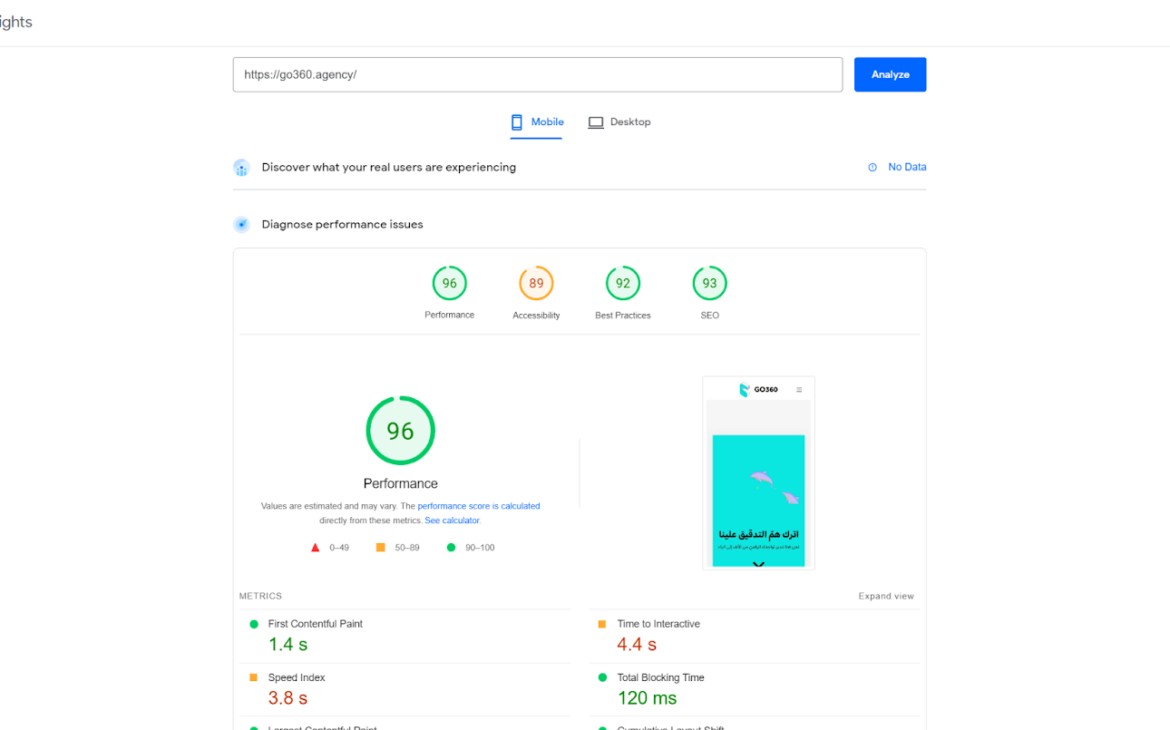
An example of this: our home page — despite the images and animated elements on it — still scores above 95 points on Google’s performance-speed scale:
The most important things to pay attention to while designing your online store:
Now, having finished creating your online store, you need to start managing it, marketing it, and generating sales. I’ll cover digital marketing for online stores and increasing sales in later articles; as for management, I’ll share the distilled experience I’ve gained from working on dozens of e-commerce projects:
I wrote in a previous article about content marketing and the importance of this type of marketing in creating long-term impact, and one of the most common mistakes many online-store managers make is neglecting this aspect or failing to prepare for it.
The most important preparation for content marketing is structuring the store the right way: using categories and tags to organize products and posts on the site, and ensuring the tools needed for search engine optimization are in place.
I’ll write a detailed guide in the coming period about structuring content in online stores, and this guide will present the best you can do to ensure your online store is ready to appear at the top of search results.
I see many online-store managers who rush to add numerous marketing features that require a very large buyer base to be worthwhile. For example: using points systems, referrals, affiliate marketing, and social media contests.
These marketing methods need a large, already-active buyer audience to contribute to increasing sales, and it isn’t a good way to start generating sales when launching the store. So we often recommend avoiding adding these features at launch and postponing them to a later time.
At the start of your launch, it’s better to focus on improving the store’s buying experience and building trust through content marketing and offering customer testimonials — and to reduce visual clutter as much as possible in the store interface.
Visual harmony in an online store matters, and following your brand’s visual identity is essential — but don’t let your imagination run too wild while designing the store. It’s enough for the store to look “cohesive” and simple to be visually acceptable; what many buyers won’t tolerate, though, is slowness.
If you’re faced with two options — one requiring you to simplify your store’s page design in exchange for greater speed, and the other requiring you to sacrifice speed for a dazzling design — the better choice in 99% of cases is to achieve greater speed.
Studies indicate that visitors 32% more inclined to abandon pages that take 3 seconds to open compared to pages that take a single second. Imagine, then, if this duration rose to more than three seconds.
A list of the most important passwords you should hold and receive from your online store’s developers:
Sub-accounts with sufficient permissions can be created for developers later. You can ask the developer to create these accounts before handing over the main account passwords.
Don’t be lazy about changing these passwords or moving the main accounts and linking them to your personal email — they are the foundations of your online store, and without them it won’t work at all.
Technical problems often occur that make the site’s dedicated email “[email protected]” — for example, it lands in spam folders instead of the main inbox. This problem can prevent buyers from completing their orders or creating their accounts, so it’s a good idea to test this feature and make sure it works fully before launching the store.