Get Marketing Insights First
Subscribe to receive actionable strategies, growth tips, and industry insights delivered straight to your inbox.

What a Call To Action really is, the forms it takes (buttons, forms, banners, links, pop-ups), the five common types, and nine practical tips for writing CTAs that actually convert — with real examples from brands doing it well.
In the world of digital marketing, every marketing material has a specific goal — whether a product landing page, a blog article, or a social media post. This goal is represented by an action the marketer wants the user to take.
Convincing the user to take this step starts with meticulous design of the page and preparing good content. But the part responsible for turning the user from a passive viewer to an engaged participant is the call to action (CTA) button — which represents one of the most important elements in the page’s marketing message.
Call-to-action buttons have many forms and different functions based on the page and its goal. In this article we’ll cover the concept of the call to action, its types, and its importance in digital marketing.
A call to action is a part of a webpage, ad, or content piece whose job is to prompt the user to take some reaction and direct them toward taking a certain action. This action can be buying a product, subscribing to a service, signing up for the mailing list, and more.
This call comes in the form of a word, phrase, or link. This element is clickable and leads the user to the next step of the sales funnel the Sales Funnel. Meticulous preparation of this call plays a fundamental role in increasing engagement and raising the conversion rate.
A call to action can appear in any marketing material with some goal. Achieving this goal requires precise writing of the call and strategic positioning so it sparks the user’s interest and prompts them to press it and move to the next stage.
Among the forms of marketing materials that include calls to action:
Calls to action can be classified by:
They split into five types:
This type of call encourages the user to take a specific, immediate action, and is usually at the end of ads, product landing pages, or emails. Examples: “Buy Now,” “Subscribe to the Service Now,” or “Book an Appointment,” and more.
These calls direct the user to get more information about a product, service, or event, taking them to a blog article or a landing page containing details about the product. Examples: “Learn More,” “Get to Know Our Services,” or “Read the Complete Guide.”
These calls encourage the user to share the content on social media platforms. We find this type of call in blog articles, videos, and newsletters. These buttons come in the form of icons matching each social media platform.
These calls are used to get opinions and ratings from users about the product or service quality and about what can be done to improve them — when the user buys the product, subscribes to the service, or finishes a trial period, and other times. Examples: “Leave a review,” “Fill out this survey,” or “Tell us what you think.”
These calls appear to the user based on their behavior patterns and preferences, and usually include their name. Examples: “A special offer for you.”
They’re also split into five types:
Buttons are the most common form of calls to action. These buttons contain clear phrases and have a distinctive design whose job is to draw the user to press them to move to the next step. The design of these buttons differs based on the company’s brand visual identity, but generally the button should be a distinct color from the page colors to be clear to the eye.
These forms are meant to take some personal information from the user to register them in the mailing list and other goals, in exchange for offering the user a free gift such as: a free trial period, a discount code, ready-made templates, an ebook, and more.
These banners appear at the top, bottom, or side of the page. The banner contains written content and has an attractive design to grab the viewer’s attention to press it.
These links appear within written text in an article or content piece, and pressing them takes the user to another article or a landing page containing details about a certain product or service.
Pop-ups are small windows that appear to the user when they spend some time on a page. These windows are distinguished by grabbing the viewer’s attention more than static buttons or banners, but they must be quietly designed so they don’t cause the user annoyance.
Slide-ins are also a good option for grabbing the viewer’s attention. They appear from the bottom or side of the page smoothly, and are distinguished by being less annoying and having less impact on the user experience than pop-ups.
Writing effective calls to action that drive visitors to press that colored button requires some study, practice, and attention to detail. Here are some tips to help you with that:
Understanding the audience is fundamental and pivotal when preparing any marketing material. By identifying the target audience’s preferences and pain points, a call to action can be written so the user understands from it that what’s being offered is capable of meeting their need and solving their problem.
Pressing the call to action should do exactly what the user understands from reading it. For example, if the user pressed a “Download Now” call, it should lead them directly to downloading a file related to the page content — not to a long chain of procedures that causes them frustration.
Vague phrasings that confuse the reader and make them ignore the call should be avoided entirely, as should phrases that don’t represent what pressing the call does. That affects the user experience and leaves a negative impression on them.
Instead of using static words like “Next” or “Available Now,” the call to action should start with strong action verbs that urge the user to press and move to the next step.
The verbs used in calls to action vary based on the company’s industry and the desired user reaction. Examples:
In every marketing material presented to audiences, there’s what’s called a Unique Selling Point — the piece that captures the viewer’s attention and becomes the reason they go ahead with the purchase. Employing this piece in the call to action plays a big role in increasing engagement and conversion rate.
Examples of this: “Sign up for a one-week trial” or “Buy now with 30-day refund eligibility” — phrases like these guarantee the user a benefit without losing anything in case of dissatisfaction. Another example is the phrase “Start your trial without your credit card details” — this phrase grabs the user’s attention because it saves them the time and frustration they’ve grown used to entering their information when trying every service.
Adding a time element to the offers presented generates in the user a motivation to take action and benefit from the offer, because of the feeling known as Fear Of Missing Out. You do this by using temporary offers, offers with limited quantities, or a countdown timer.
Examples of this: phrases like “Take advantage of the deal available until Friday” or “Seize the opportunity before quantities run out” or “Buy today and enjoy 20% off.”
This strategy is useful, especially during seasonal times of the year like birthdays and others when demand grows on certain products. But caution and credibility must be exercised when using it — steer clear of overdoing it or misleading the user by inventing illusions of temporary offers and limited quantities. That causes significant damage to the user’s trust in the brand.
This point is fundamental when designing everything related to the website, and the same applies to calls to action. Taking into account that a significant share of users rely on smartphones in their daily searches, it’s essential that the website’s pages and calls to action on them be compatible with their phone screens.
What sets smartphones apart from laptops and tablets is the user’s ability to make calls on them. The importance of this point stands out for companies offering certain services or requiring appointment bookings — using calls like “Call us now at this number” or “Contact us for more information.”
It’s essential that noticing the call to action be easy for the user — by making it a distinct color clear to the eye, and placing it in more than one spot on the page if possible.
For example, if we had a landing page for downloading a certain app, users here split into three segments:
is used A/B tests across the various fields of digital marketing — on landing pages, emails, ads, and more. It’s a statistical method that relies on comparing a primary version (A) with another version (B) to identify which of the two performs better and to adopt it in the future.
These tests can be applied to calls to action too, by comparing two versions of the call’s wording and identifying the one with the higher conversion rate. For example, if we had a landing page for a certain product, we could compare a “Buy Now” button with “Shop Now” and identify the best of the two.
Sometimes it’s useful to add some motion and humor to call-to-action buttons to stand out among competitors, while taking into account fit with the company’s visual identity and its usual tone of voice.
An example that caught my attention on this point is the website programming company (Huemor):
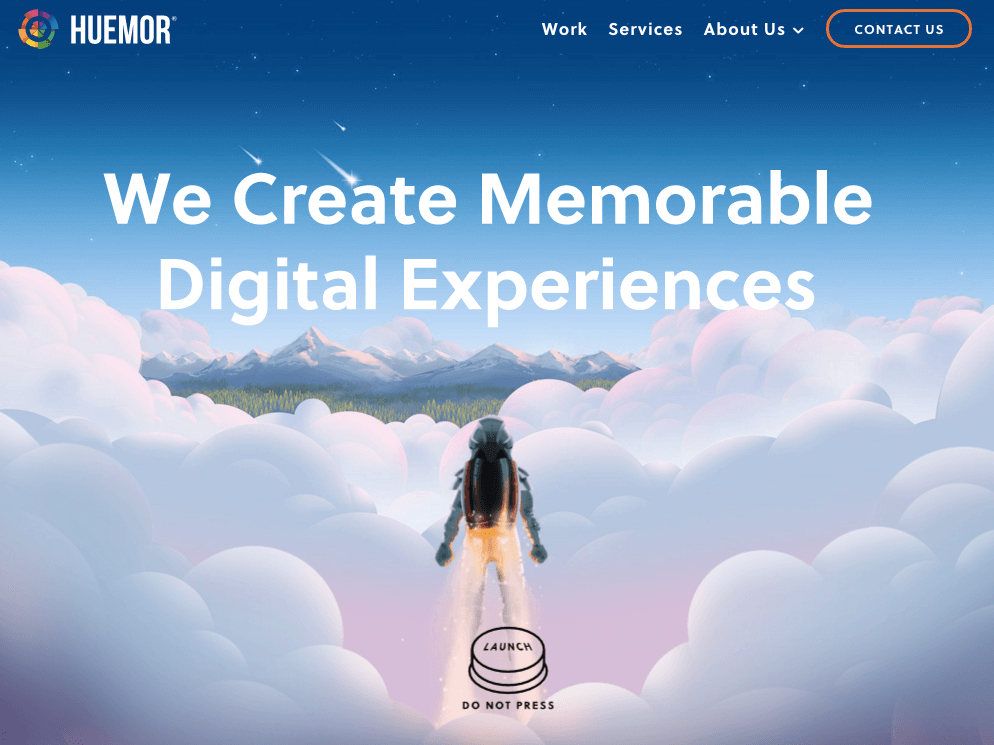
Instead of using a traditional call like “Contact Us,” the word “Launch” was used with a call-to-action button resembling the spacecraft-launch buttons we see in films, along with the phrase (Don’t press this button) to play on the reverse-psychology angle.
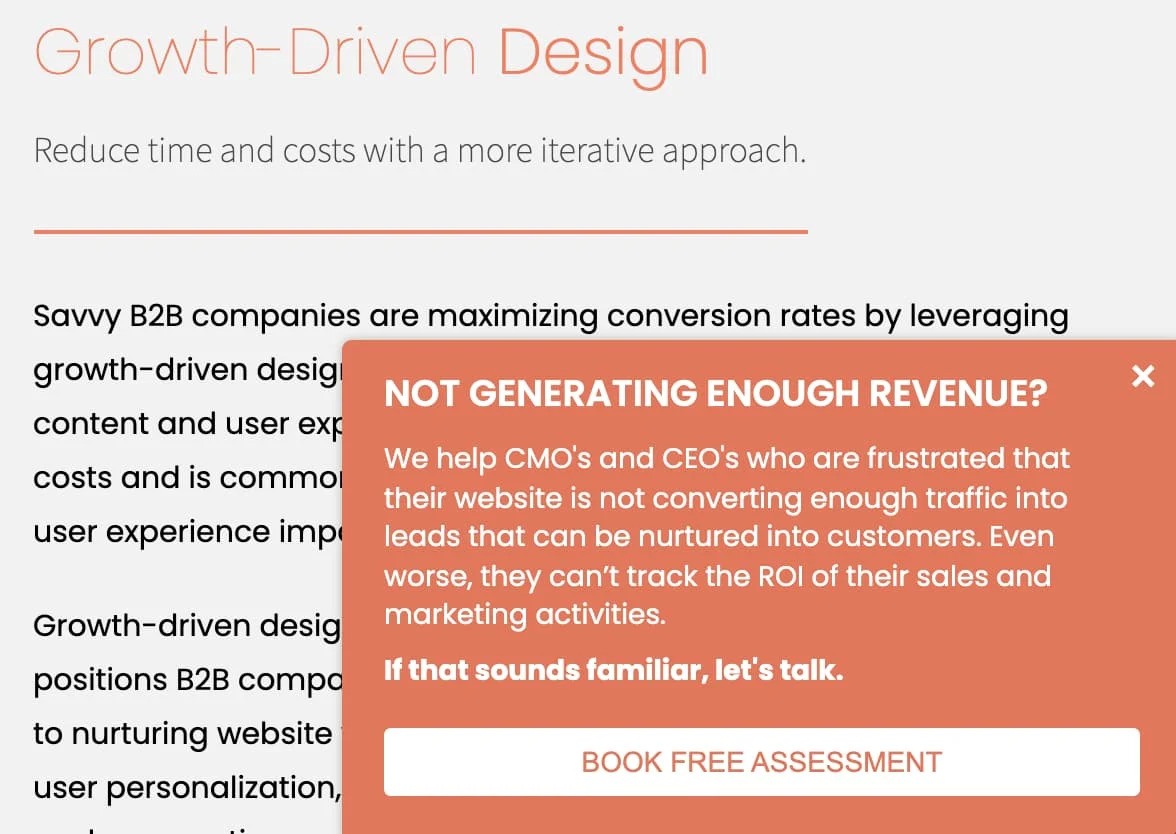
This company is a B2B that offers marketing and sales services to other companies. A call to action was used in the form of a slide-in window addressing the user with a bold headline (Not making enough profit?) with a brief explanation of the service it offers them, and finally a call-to-action button: “Book a free consultation.”
The reason for this call’s success is clarity in what’s being offered to the user, in addition to offering a free service that ensures grabbing the viewer’s attention with an offer they can’t miss.

This company offers personal financial consulting to consumers. Instead of using a traditional phrase like “Subscribe to the newsletter” to grow the mailing list subscribers, the phrase “Subscribe for good things weekly” was used — a phrase more distinctive among competitors and suited to the personality of the company’s founder and her tone of voice with her audience.