Get Marketing Insights First
Subscribe to receive actionable strategies, growth tips, and industry insights delivered straight to your inbox.


What bounce rate really is, how it's measured in Google Analytics (Universal Analytics vs GA4), the reasons pages record high bounce rates, and practical strategies for lowering it and improving both user experience and search ranking.

Every entrepreneur has a website. This site is the destination they drive customers to for shopping their products and getting acquainted with their services. They care about its design and prepare its landing pages. Visitors start entering this site but soon leave without taking any action — in other words, they bounce.
What made those visitors bounce? How can we know the direct factors that caused it? And are there solutions?
In this article we’ll look at the concept of bounce rate, the reasons behind it, and some practices that help lower it.
Bounce rate is the share of users who visited one of the website’s pages and then left without moving to any other page or taking any action. This rate is a metric that tells us the number of times people visit the website and leave directly without browsing more of its content.
Bounce rate for a certain page is calculated by dividing the number of single-page visits by the total number of visits and multiplying by one hundred to get a percentage:
Bounce Rate = (Number of Single-Page Visits / Total Number of Visits) * 100
Bounce rate is one of the important metrics for measuring how effective a website’s pages are. Sometimes, depending on the page’s purpose, a high bounce rate can be evidence of weak page performance or a negative impact on the user experience. For landing pages, for example, bounce rate is one of the sensitive measures, and a rise in this rate above typical thresholds is matched by a drop in sales of the product or service offered on that page.
A website’s pages should hold the visitor’s interest and encourage them to browse more of the site’s content. The longer a visitor spends on the site, the greater the likelihood they’ll buy something. Bounce rate also has an effect on search engine results to some extent: a high bounce rate negatively affects SEO — while conversely, when visitors spend time on the website, that’s a signal to search engines that the visitor is finding value and benefit in this site’s content.
Bounce rate, as we mentioned, is for people who visited a single page without moving to any other. Exit rate, on the other hand, is the share of people who leave a certain page but not necessarily as the first page they entered — they may have taken a tour of the site and moved among several pages before leaving.
Based on that, we can say that every bounce is an exit but not every exit is a bounce, and so exit rate isn’t a warning sign as much as bounce rate is.
There are several factors that must be taken into account when judging the bounce rate for a certain page:
On some pages, the visitor can get what they want without moving to another — such as a blog article page, for example. The bounce rate here is high, ranging from 70% to 90%, and that’s not strange: the visitor takes the information they want from the article and leaves, or moves on to reading another article.
But if we look at the site’s home page, its purpose is moving between the site’s other pages, and a high bounce rate here is a warning sign — the causing factors must be looked into. The same goes for landing pages that must achieve sales or any other purpose they were designed for. A high bounce rate on them is evidence of their inability to convince the visitor to take the required action.
Typical bounce-rate thresholds vary based on the devices visitors use to enter the website. Mobile phones record higher bounce rates than desktops and tablets, and this rule applies to companies across various fields.
Google provides several tools for measuring bounce rate. The first is Google Universal Analytics. This tool measures bounce rate by counting every session the visitor spent on the page without interacting with any of its contents. That is, even if the visitor spent several minutes on the page without moving to another or pressing one of the CTA buttons, that counts within the bounce rate.
We can call this tool “old” or “classic,” so to speak — because Google will stop using this tool as of July 1, 2024, to open the way for the new tool we’ll talk about.
Second, we have Google Analytics 4. This tool measures bounce rate by counting the share of non-engaged sessions. The concept of an engaged session per Google’s definition is a session in which the visitor spends more than 10 seconds on the page, or is directed by pressing one of the CTA buttons, or browses more than one page.
In this case, even if the visitor doesn’t take any action on the page, simply staying on it more than 10 seconds means this session won’t be counted within the bounce rate.
There are several problems that can cause visitors to bounce from the pages of your website, including:
With the significant advancement the world is seeing in internet speed, the user will never tolerate slow web-page loads and will bounce immediately to look for what they need elsewhere. Any load time exceeding three seconds is a problem that will cause plenty of visitor bounces — and slow loading also negatively affects the page’s visibility in search results (SEO), because this slowness causes a poor user experience, and Google’s search algorithm takes the best user experience into account when displaying search results.
Among the bad things that hurt the user experience is a user reading a page title and opening it only to find content that doesn’t match what they were expecting from its title — so they bounce immediately to elsewhere. Whether that happens by mistake or to target certain keywords by putting them in a misleading clickbait title, these are practices that should be avoided.
If a high bounce rate is noticed for a certain page, its content should be reviewed to make sure it matches the title. In case of conflict between them, the title or the content must be adjusted to fix that.
A very high bounce rate for a certain page may be due to a programming glitch on it, such as the page not loading properly for the user, appearing as a blank page, showing an Error 404 message, or taking a very long time to load.
If a certain page shows a high bounce rate, the problem must be examined from the user’s point of view — try opening the page from several devices and several internet browsers to make sure the site is free of any problems of this kind.
A poor way of presenting content causes a rise in the page’s bounce rate. This page must be looked at through the eyes of the ordinary user being targeted and drawn to the website.
Among the elements that should be present in the page’s content is the user’s easy understanding of its goal as soon as they arrive — by using simple sentences in bullet order that answer their questions, and the presence of some visual elements — images and short videos — that simplify concepts and are easy on the eye.
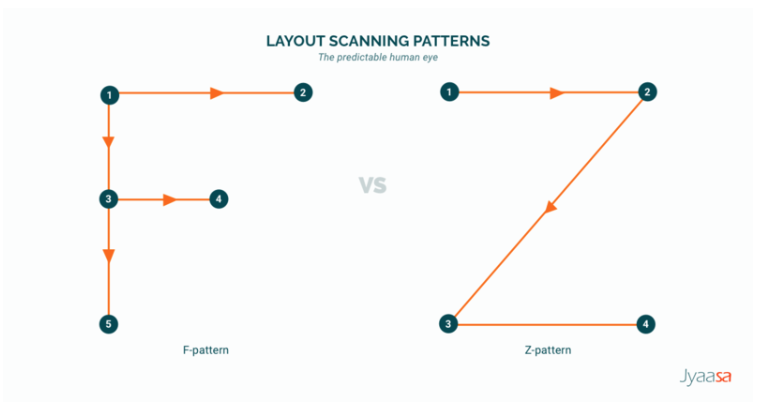
Landing pages have a certain design and a clear sequence of elements that’s easy for users to understand and more familiar to them. Examples include the well-known Z-shape or F-shape design that leads the user smoothly through the page’s content toward the CTA button. Straying from these familiar design shapes may not appeal to the user and cause them to bounce from the page.
You must also stay away from elements that cause a poor user experience — including too many ads, crowded CTA buttons, pop-ups that appear full-screen and cause user frustration, and difficulty moving between the website’s pages.
This problem doesn’t just raise the bounce rate — it also weakens the page’s visibility in search results, since Google’s algorithm now favors mobile-friendly sites over others.
What happens on these incompatible sites is that when the page opens at phone-screen size, the page elements get mixed up and their positions change, and menu buttons appear in a small size that’s hard to press without zooming in. All these matters reflect negatively on the user experience and cause them to bounce from the page.
When a certain page shows a high bounce rate, our first choice shouldn’t be a complete redesign of the page or deleting it altogether. There are several things that can be applied to lower the bounce rate, including:
As we explained earlier, speed is an important factor in improving the user experience and in SEO. Among the things that can be applied to increase page load speed are pursuing simplicity in design and staying away from unnecessary elements that slow loading, compressing images to the smallest possible size while preserving their quality of course, and using short videos.
Given the huge number of users who rely entirely on smartphones to browse the internet, preparing sites for these phones has become a basic need — not a luxury. This is of course one of the tasks of the web-design team: they should make the website easy to browse and move between elements on, suitable for phone screens, using larger font sizes and short videos that focus concisely on the essential points.
Google provides a tool (Lighthouse) for developers, which enables them — among its multiple uses — to verify the website’s compatibility with smartphones.
To start with, content should match the title and cover keywords it ranks well for in search results. Misleading titles and content that doesn’t give the user the value it promised will generate nothing but a high bounce rate.
Content should be easy to read and quick to skim. Many users want to get information fast and want to find it easily. You do this by using subheadings that split the content into small parts that are easy to understand, writing short sentences in bullet order with suitable spaces between them where each gives a specific idea, using supporting images and videos, and caring about proofreading.
Every user who arrived at this page from the site came for a specific purpose, and the elements that don’t serve this interest must be removed — such as too many ads and pop-ups filling the screen, multiple CTA buttons performing different tasks, and too many visual embellishments that distract the user from the substance.
Every page has a specific goal, and so the CTA buttons on a single page should perform a specific function. Pop-ups are useful if used correctly — appearing to the user smoothly and performing a function that matches the page’s context. Any additional elements with secondary tasks — such as social media accounts — should be placed in a neutral spot or at the bottom of the page.
Visitors reach a web page from various sources — that can be pressing a link in an email, a Google search result, pressing a paid ad, or a link in a social media post. Identifying the source of visits that raises the bounce rate can point us to the heart of the problem.
For example: if the source is a paid ad on Facebook, the ad’s title or text may not match the page’s content and cause visitors to bounce from it when they don’t find what they expected to find on it — in which case its wording must be adjusted.
Including problems related to the site’s programming that cause glitches in opening the page for the user and abnormal load times. Problems of this kind are solved by a website programming specialist, or by buying more space on the site’s server.
Some features help the visitor find what they need from the page easily, such as a search box that gives predictions of frequent search phrases, helper filters, and a table of contents in long articles (like the table at the top of this article) that makes it easy for the user to find and reach specific ideas in the content.